Open Banking Prerequisites
Some products require Open Banking inputs (e.g., FinancialInstitutionId, AccountsLinkId). Use this page to gather those once, then reuse them across products.
Applies to every Open Banking product: Single API, Income Verification, E-Statement, Average Balance, Account Insights, Credit Profiling and Cash Flow.
Every call on this page needs a valid access token — see Getting Started → Authentication for how to get one. Request the product's own scope when generating it — for example e_statement. You can put more than one scope in the same token by separating them with spaces, for example e_statement single_api, as long as your app is subscribed to each product. The same scopes work in Production; only the base URL changes.
Consent Management Journey
Four stages, in order. Everything below assumes the token from the callout above.
List Financial Institutions (Sandbox)
You must be subscribed to the Financial Institutions product before calling this endpoint.
https://test.api.neotek.sa/financial-institutions-information/v1/financial-institutionsSandbox URL · in Production call https://api.neotek.sa
Use this to discover banks and supported security profiles / data groups
curl 'https://test.api.neotek.sa/financial-institutions-information/v1/financial-institutions' \ -H 'Authorization: Bearer <ACCESS_TOKEN>'Response (trimmed to one institution)
{ "Data": { "FinancialInstitution": [ { "FinancialInstitutionId": "BSFRSARI", "FinancialInstitutionName": { "NameEn": "Banque Saudi Fransi", "NameAr": "البنك السعودي الفرنسي" }, "Logo": "https://api.public.neotek.sa/assets-neotek/financial-institutions/BSFRSARI.png", "SecurityProfiles": [ "Redirection" ], "IsActive": true } ] }}Use the FinancialInstitutionId when creating an accounts link, and check SecurityProfiles for the profile that bank supports.
Create an Accounts Link
You must be subscribed to the Accounts Links product before calling this endpoint.
https://test.api.neotek.sa/accounts-information/v1/accounts-linksSandbox URL · in Production call https://api.neotek.sa
Headers:
| Parameter | Required | Description |
|---|---|---|
authorization | Required | Bearer <ACCESS_TOKEN> |
Content-Type | Required | application/json |
x-request-id | Optional | an RFC 4122 UUID you generate; quote it when raising a support ticket |
Body — every field below goes inside Data:
| Parameter | Required | Description |
|---|---|---|
PSUId | Required | string. The id you use for this customer in your own system. Keep it consistent — every product call resolves the customer's consented accounts from it |
FinancialInstitutionId | Required | string. The bank's SWIFT BIC, taken from the List Financial Institutions response above |
SecurityProfile | Required | string. Redirection — the consent authorization flow |
DataGroups | Required | array of object. The data being requested; see the table below |
AccountTypesList | Optional | array of string. KSAOB.Retail or KSAOB.Corporate. The spec defaults it to Retail, but Sandbox needs it sent explicitly — pair KSAOB.Retail with SAIBCSARI there. Send KSAOB.Corporate for a business customer |
AccountSubTypesList | Optional | array of string. Narrows the consent to certain products — one or more of CurrentAccount, Savings, CreditCard, PrePaidCard, EMoney, ChargeCard, Other |
PurposeList | Optional | array of string. The business purpose of the consent — one or more of Account Aggregation, Personal Finance Manager, Electronic Verification, E-Statement, Credit Assessment, Tax Filing, Enterprise Financial Management, Letter Of Guarantee, Other |
ExpirationDateTime | Optional | date-time. When the consent expires. Omit for a long-lived consent |
TransactionFromDateTime | Optional | date-time. Earliest transaction the consent covers |
TransactionToDateTime | Optional | date-time. Latest transaction the consent covers |
UserLoginId | Optional | string. A login hint for the customer, Decoupled security profile only |
Each entry in DataGroups:
| Parameter | Required | Description |
|---|---|---|
DataGroupId | Required | string. One of AccountDetails, AccountTransactions, RegularPayments, PartyDetails |
Permissions | Required | array of string. What you may read within that group: ReadAccountsBasic, ReadAccountsDetail, ReadBalances, ReadTransactionsBasic, ReadTransactionsDetail, ReadTransactionsCredits, ReadTransactionsDebits, ReadBeneficiariesBasic, ReadBeneficiariesDetail, ReadScheduledPaymentsBasic, ReadScheduledPaymentsDetail, ReadDirectDebits, ReadStandingOrdersBasic, ReadStandingOrdersDetail, ReadParty, ReadPartyPSU, ReadPartyPSUIdentity. Ask only for what you use — the customer sees this list on the consent screen |
Testing? Send "FinancialInstitutionId": "SAIBCSARI" together with "AccountTypesList": ["KSAOB.Retail"].
Sandbox needs both. SAIBCSARI is the BIC of The Saudi Investment Bank, the
Sandbox institution, and its consent journey opens the
Model Bank. Send KSAOB.Retail explicitly rather than
relying on the default — without it the link will not complete in Sandbox.
Together they let you walk a link end to end without a real bank.
curl -X POST 'https://test.api.neotek.sa/accounts-information/v1/accounts-links' \ -H 'Authorization: Bearer <ACCESS_TOKEN>' \ -H 'Content-Type: application/json' \ -d '{ "Data": { "PSUId": "PTP100", "FinancialInstitutionId": "SAIBCSARI", "SecurityProfile": "Redirection", "AccountTypesList": ["KSAOB.Retail"], "DataGroups": [ { "DataGroupId": "AccountDetails", "Permissions": ["ReadAccountsBasic"] } ] }}'Response — AccountsLinkId is what every product call needs afterwards; RedirectionURL is where you send the customer to give consent
{ "Data": { "AccountsLinkId": "2586", "RedirectionURL": "https://developer-portal.neotek.sa/ob/initiate-consent?..." }}Model Bank (Sandbox)
The RedirectionURL in that response is where the customer gives consent. In
production it takes them to their own bank; in Sandbox it takes them to the
Model Bank, a simulated bank that stands in for every institution so you can
walk the journey end to end without a real bank connection.
https://developer-portal.neotek.sa/ob/initiate-consent?...The URL is returned per accounts link and carries that link's own reference in its query string — take it from the response you just received. Do not hardcode the example above, and do not reuse a URL from an earlier link.
What the customer does there
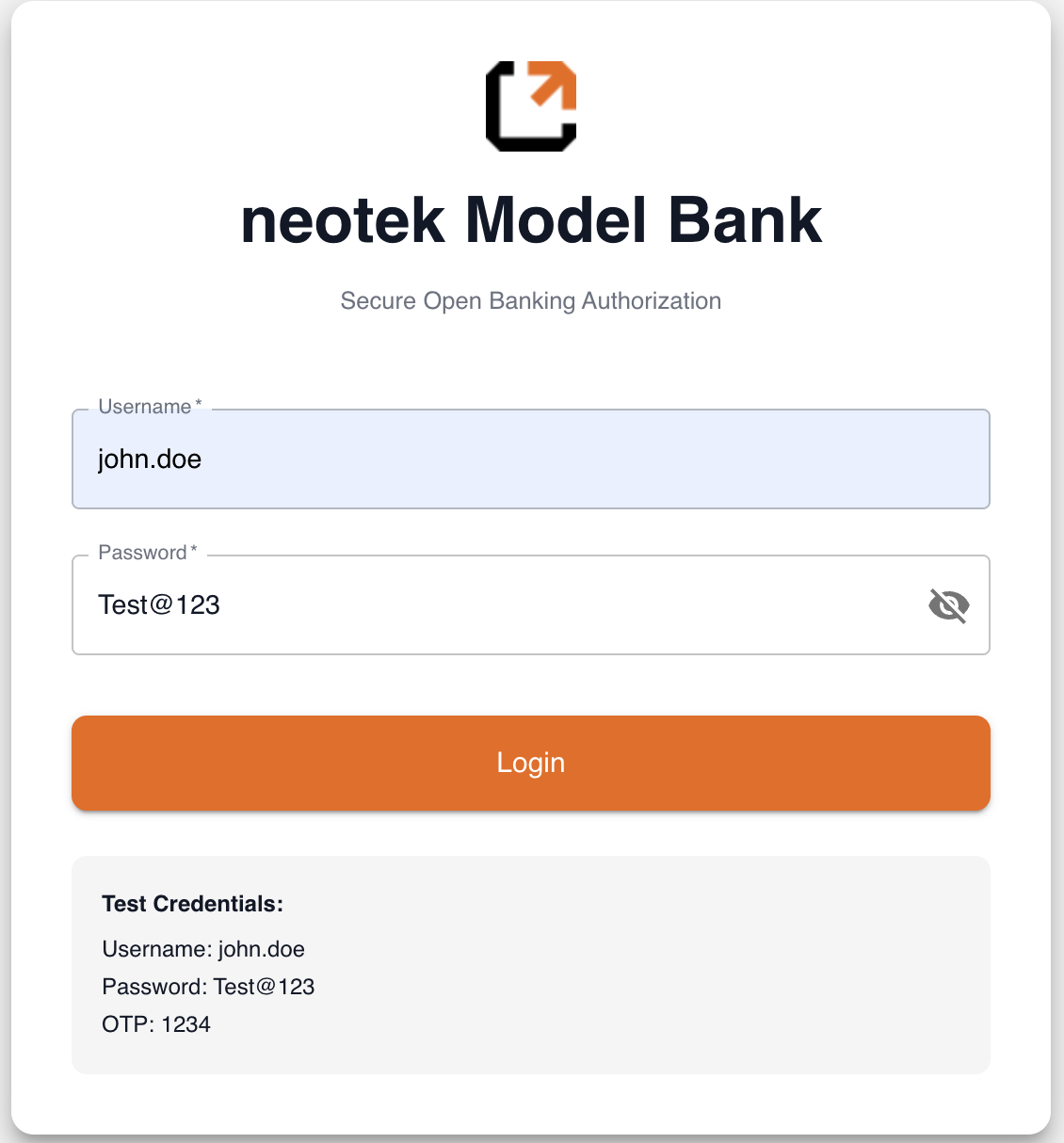
Opening the RedirectionURL lands them here. On mobile in production this is
their own bank's app; in Sandbox it is the Model Bank in the browser.
1 · Signs in. The Sandbox credentials are printed on the screen itself —
username john.doe, password Test@123.
2 · Enters the one-time code. The Model Bank asks for an OTP before it
will show any accounts. Use 1234.
3 · Reviews the permissions and picks accounts. The permissions listed
are exactly the Permissions you sent in DataGroups — this is where the
customer sees what you asked for. Each account has a checkbox, with a
select-all beside the list.
4 · Confirms and authorizes. Approving here is what moves the link to
Active.
Consent is given at the bank, not through this API — nothing you call moves the link forward on its own.
What happens next
In Sandbox the link is Active as soon as they approve — you can call the
product endpoints straight away, with the same AccountsLinkId you created.
If you want to confirm it programmatically before calling, fetch the link and
read its Status — see Check link status
below.
Check link status (until Active)
You can list or fetch the link to see its status. The API supports filtering by PSUId, FinancialInstitutionId, Status, etc.
curl -G 'https://test.api.neotek.sa/accounts-information/v1/accounts-links' \ -H 'Authorization: Bearer <ACCESS_TOKEN>' \ -d 'PSUId=PTP100'Response (key fields)
{ "Data": { "AccountsLinks": [ { "AccountsLinkId": "2594", "PSUId": "PTP100", "FinancialInstitution": { "FinancialInstitutionId": "SAIBCSARI", "NameEn": "The Saudi Investment Bank" }, "Status": "Active", "CreationDateTime": "2026-07-28T12:07:28Z", "ExpirationDateTime": "2027-07-28T12:07:28Z", "SecurityProfile": "Redirection" } ] }}Status codes: Active, Pending, Rejected, Revoked, Expired. Only
an Active link returns product data.
When Active, use AccountsLinkId with the target product (e.g., E-Statement).
Reusing the link across products
Once you have an Active AccountsLinkId, you can call supported Open Banking products without repeating the bank login. Keep your PSUId consistent across calls. (See each product page for exact payloads.)